
RODAR® II setup & specs, made simple.
Where to place it. How to aim it. When one unit is enough. The practical details that help your ultrasonic pest repeller work the way it was designed.
RODAR® II is a plug-in electronic pest deterrent designed to help make pest-prone indoor spaces less comfortable for rats, mice, bats, squirrels, fleas, roaches, and other unwanted pests — without bait, poison, sprays, or traps to set.
 23–55 kHz ultrasonic range
Three steps before you walk away.
RODAR® II is simple to use, but setup still matters. The front of the unit needs a clear path into the space you want to protect, and the unit should stay on continuously.
Place it where sound can travel.
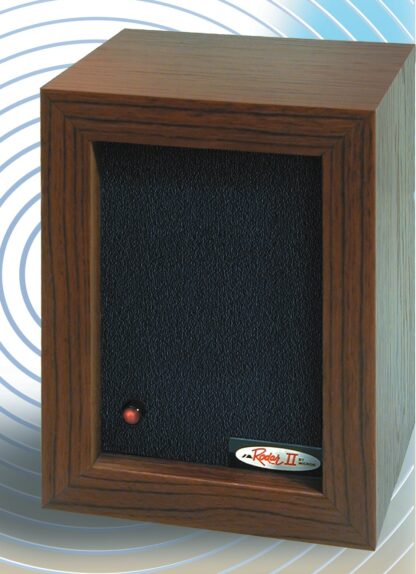
Put RODAR® II on a shelf, table, counter, or wall mount so the front panel faces the room, travel path, roosting area, pantry wall, garage bay, attic space, or storage zone where pests are active.
Plug it into a standard outlet.
Use a standard 110–120V outlet for the U.S. model. The red LED blinks to show the unit is operating. A slight mechanical crinkle can be normal during operation.
Leave it running continuously.
For best results, keep the unit plugged in 24 hours a day. Give the space time to respond, remove food and water sources, reduce clutter, and seal entry points as activity changes.
Ultrasonic coverage needs a clear path.
Think of RODAR® II like a sound source, not a scent, fog, or chemical treatment. Ultrasonic sound travels through open air and can reflect off hard surfaces, but walls, closed doors, heavy furniture, packed boxes, cabinets, and dense storage can block or reduce coverage.
- ✓Place or mount the unit about 3 to 7 feet from the floor when possible.
- ✓Face the front panel toward the protected area, pest path, or suspected activity zone.
- ✓Angle the unit toward a wall when useful so hard surfaces can help reflect sound into the room.
- ✓Use additional units for divided rooms, multi-level spaces, cluttered storage, or unusually difficult areas.
How many RODAR® II units do you need?
One unit is rated to cover up to 3,000 square feet under favorable conditions. The best answer depends less on the size of the building and more on how sound can move through the specific space.
One open area
A basement, garage bay, attic area, workshop, or open storage room may be a good one-unit setup if the front of the unit has a clear path across the space.
Divided rooms
Walls and closed doors can reduce ultrasonic coverage. If pests are active in separate rooms or on separate floors, plan for more than one unit.
Cluttered storage
Boxes, shelving, furniture, and stored materials can block sound paths. Reposition the unit or add a second unit where the signal is obstructed.
Problem zones
Place coverage where activity is happening: droppings, scratching, nesting material, roosting, pantry activity, garage entry points, or attic movement.
The numbers that matter.
Use these specifications as a buying and setup reference. Coverage, performance, and timing can vary by room layout, obstructions, pest pressure, and how well food, water, shelter, and entry points are managed.
Use it where pests try to settle.
The best setup starts with the area where pests are already active or most likely to enter. Keep the front of the unit visible to the space, not buried behind storage.
Face food-prone areas.
Aim across pantry walls, baseboards, appliances, or known travel paths. Keep food sealed and clean crumbs, grease, and spills so pests have fewer reasons to stay.
Keep the sound path open.
Place the unit where it can cover garage bays, storage walls, utility areas, crawlspace access, or basement corners without being blocked by boxes or equipment.
Aim toward activity.
For bats, squirrels, or mice, aim toward suspected roosting, nesting, or entry areas. Seal openings only after animals have left and follow local wildlife guidance.
Reduce hiding places.
Dense storage can block ultrasonic sound. Create open aisles, lift boxes off the floor when possible, and use extra units for long or heavily packed rooms.
Run it before pests move in.
Use RODAR® II continuously in seasonal spaces where mice and insects may look for quiet shelter. Seal food, close gaps, and check activity when returning.
Protect everyday spaces.
Use in offices, workshops, restaurants, back rooms, farms, and storage areas where a non-chemical deterrent can run quietly in the background.
Same device. Smarter setup by pest type.
The red slash-through icons keep the goal clear: pests do not belong in the spaces people live, store, work, or relax. Use these notes to match the setup to the problem.

Rats & mice
Aim toward travel paths, baseboards, crawlspace openings, garage edges, or activity zones. Remove exposed food and seal openings so the space becomes less useful to rodents.

Squirrels & chipmunks
Use in attics, eaves, basements, and storage areas. Aim toward nesting or entry areas, then seal openings after animals have left and no young are trapped inside.

Bats
In attics or garages, place the unit where the front panel can face the roosting or entry area. Keep it running after activity stops and follow local rules for bat exclusion.

Fleas, roaches & other pests
Use RODAR® II as part of a broader plan. Vacuum, clean, remove food and water, open cabinets and drawers when appropriate, and keep the unit aimed toward the infested space.
Give the area time to respond.
Every pest problem is different. Existing nests, food sources, water, open entry points, room layout, and blocked sound paths can all affect results. If activity continues, reposition the unit or add coverage before giving up on the setup.
Place, aim, plug in.
Set the unit where the front panel has a clear path. Confirm the red LED is blinking and leave the unit on continuously.
Remove what attracts pests.
Clean food sources, fix leaks, reduce clutter, and look for new droppings, sounds, tracks, or signs of activity. Keep the unit running.
Evaluate and adjust.
Many customers look for improvement within two to three weeks. Difficult spaces may need a different angle, a clearer path, or additional units.
Small placement choices can make a big difference.
Use this quick checklist with the printed insert or the online product instructions before deciding whether a room needs repositioning or another unit.
Do this
- ✓Point the front panel into the protected space.
- ✓Mount or place the unit about 3 to 7 feet from the floor when practical.
- ✓Leave RODAR® II plugged in 24 hours a day.
- ✓Remove exposed food, water, clutter, and open entry points.
- ✓Use more than one unit for divided or heavily obstructed areas.
Avoid this
- ×Do not hide the unit behind furniture, boxes, curtains, cabinets, or appliances.
- ×Do not expect one unit to cover through walls, closed doors, or separate floors.
- ×Do not switch it off at night or only run it occasionally.
- ×Do not hold the operating unit up to your ear.
- ×Do not use it near pet rodents or similar small animals you want to keep comfortable.
Pair ultrasonic deterrence with basic pest prevention.
RODAR® II is designed to help make a protected space less comfortable for pests. For the strongest setup, also make that space less useful to them.
Designed to run quietly in the background.
RODAR® II is not a novelty gadget. Micron has manufactured RODAR® systems since 1992 and has been involved in the design, manufacture, marketing, fulfillment, and support of the product since its early years.
That electronics background matters for a device intended to stay plugged in, run continuously, and support a practical pest-prevention plan.
Quick answers before you plug in.
Use these answers to choose the right room, avoid common placement mistakes, and understand what the specifications mean in real homes and workspaces.
Does RODAR® II ultrasonic sound go through walls?
No. Ultrasonic sound travels through open air and can reflect off hard surfaces, but walls, closed doors, cabinets, heavy furniture, and stacked storage can block or reduce coverage.
How many units should be used?
One unit can cover up to 3,000 square feet under favorable conditions. Separate rooms, closed doors, divided floor plans, cluttered storage, or multiple activity zones may require more than one unit.
Where should the unit be placed?
Place it where the front panel faces open room space or the area where pests are active. A shelf, table, counter, or wall location about 3 to 7 feet from the floor is often a practical starting point.
What does the red LED mean?
The red LED blinks to show that RODAR® II is operating. Leave the unit plugged in continuously for best results.
Can people hear RODAR® II?
RODAR® II operates in an ultrasonic frequency range above normal human hearing. A slight mechanical crinkle can be normal. Do not hold the operating unit up to your ear.
Is RODAR® II safe for pets?
RODAR® II is listed as safe for non-rodent pets. Because it is designed to repel rodents, avoid using it near pet rats, mice, hamsters, gerbils, guinea pigs, or similar small rodent pets.
Can RODAR® II be used outdoors?
Indoor use is recommended for best performance. If used in a protected outdoor or semi-outdoor area, keep the unit fully shielded from weather and aim it directly at the area to be protected.
What should be done if activity continues?
Check placement first. Move the unit out from behind obstructions, aim it toward activity, remove food and water sources, seal entry points, reduce clutter, and consider adding a second unit for divided or difficult areas.
Order RODAR® II and place it where pests are trying to settle.
Choose the quantity that matches your layout. Start with the main problem area, then add units for separate rooms, blocked paths, attics, garages, basements, cabins, campers, or work areas.