
 IONIZER AIR PURIFIER
 EnergAire® product support
Clear answers. Practical help. Direct from Micron.
Get help choosing, setting up, caring for, returning, or ordering EnergAire®—including placement guidance, fan-assisted airflow, warranty questions, and RMA support.
Manufactured & supported by Micron
Start here
Choose the support path that fits the question.
EnergAire® support should feel simple. Start with the situation that matches what you need, then contact Micron with the details that help us respond quickly.
Before buying
Ask about room size, placement, negative ion technology, filter-free operation, or whether a fan can help circulate room air.
Review EnergAire®Setup & placement
Find practical guidance for open room air, continuous operation, particle buildup, and gentle cross-room airflow.
View setup helpCare & troubleshooting
Understand quiet operation, normal surface dust, safe cleaning, and the checks to make before contacting service.
See common answersOrders, returns & RMA
Get the right process for a warranty question, 30-day money-back request, return authorization, or order issue.
Review RMA stepsPlacement first
Small setup choices make support easier.
There is no app, filter indicator, or cartridge schedule to manage. Start with the room and the air path.
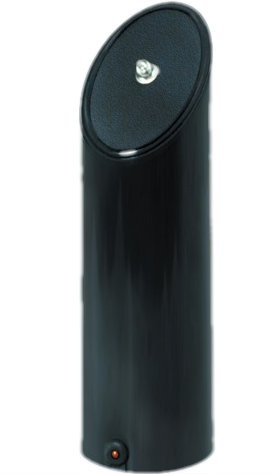
Place it upright with open air around it.
Set EnergAire® on a stable surface. Keep the housing clear of curtains, books, furniture, and tightly packed storage.
Connect the suitable voltage model.
Use the appropriate model and outlet for your location. The unit operates quietly without an internal fan.
Let it run as part of the room-air routine.
Continuous operation provides steady ionization support. Continue normal ventilation, source control, dusting, and vacuuming.
Add gentle cross-room airflow when useful.
Place a small fan behind or slightly offset from EnergAire® and aim it across the room. The goal is broad circulation, not a direct high-speed blast.
Better answers, faster
Have these details ready before contacting support.
A few details make it easier to answer setup questions, identify order issues, and determine the right warranty or RMA next step.
Product details
Have the model or SKU, purchase date, order number, and where the product was purchased.
Room layout
Describe the room, furniture, storage, doors, airflow, and where EnergAire® is positioned.
What you are seeing
Explain whether the question involves power, quiet operation, dust near the unit, placement, or an order.
Photos when useful
A clear photo of the unit, label, cord, placement, or surrounding room can reduce back-and-forth.
Care & troubleshooting
Quiet by design. Easy to check.
EnergAire® has no filter, bag, cartridge, or internal fan. Start with the simple checks below and contact Micron when the question is more specific.
- Confirm the unit is connected to a suitable, working outlet.
- Keep EnergAire® upright and unobstructed in open room air.
- Turn the unit off and unplug it before wiping the exterior with a soft, dry cloth.
- Keep water, cleaning spray, and other liquids away from openings.
- Wipe or vacuum nearby surfaces as part of normal cleaning if particles settle around the unit.
- Do not open the housing or attempt electrical repairs yourself.
Warranty & service
When you need the next step, start with Micron.
EnergAire® includes a 12-month warranty and a 30-day money-back guarantee. Contact Micron before sending anything back so the team can confirm the applicable terms and provide the correct return instructions.
How the RMA process works
RMA means Return Merchandise Authorization. Please request one before sending an EnergAire® product back.
Micron Corporation
Attn: Customer Service / RMA
89 Access Road
Norwood, MA 02062 USA
Helpful resources
Find the answer without waiting.
The EnergAire® pages work together as a simple support library for understanding the technology, placing the unit, and reviewing the product details.
How it works
Understand negative ions, particle behavior, and the role of room airflow.
Read how it worksSetup & specs
Review placement, charts, specifications, fan-assisted airflow, and FAQs.
View setup & specsNegative ions
See the particle-size references and reliable outside information about ionization.
Explore negative ionsMicron Store
Order EnergAire®, review current product information, or contact the store team.
Visit the storeContact EnergAire® support
Need help from a person?
For product support, setup questions, warranty service, RMA requests, replacement information, or reorders, contact Micron using the support details below.
Micron support contact
89 Access Road
Norwood, MA 02062 USA
For order questions and online requests, the Micron Store contact form is also available.
Support FAQ
Answers before the next step.
These answers are written for customers who need practical help with choosing, setting up, troubleshooting, ordering, or returning EnergAire®.
What is the fastest way to get EnergAire® support?
Call Micron toll-free at 1-800-456-0734 or call (781) 949-3500. You can also email service@microncorp.com or use the Micron Store contact form.
What information should I include in a support email?
Include your name, order number or approximate purchase date, product model or SKU, a short description of the question or issue, and clear photos when they would help explain the situation.
Does EnergAire® use a filter?
No. EnergAire® is filter-free. There are no cartridges, bags, pads, or replacement filters to buy, clean, or replace.
How do I request an RMA for EnergAire®?
Contact Micron before shipping the product back and request a Return Merchandise Authorization, or RMA. Provide your order information and a description of the issue. Do not ship a return without receiving RMA instructions.
What warranty and guarantee apply to EnergAire®?
EnergAire® includes a 12-month warranty and a 30-day money-back guarantee. Contact Micron before sending a product back so the team can confirm the applicable terms and provide the correct next step.
Can I use a fan with EnergAire®?
Yes. In a larger or active room, a small fan can create gentle cross-room airflow. Place it behind or slightly offset from EnergAire® and aim the air across the room rather than directing a high-speed blast into the unit.
Does EnergAire® replace ventilation or cleaning?
No. EnergAire® is one part of a room-air routine. Continue appropriate ventilation, source control, dusting, vacuuming, moisture control, and any other method suited to the specific air concern.
Get the next step from Micron.
Whether you are setting up EnergAire®, checking a warranty question, or requesting an RMA, direct support is available.