

Plug in. Aim clearly. Leave it on.
RODAR® II is simple to set up. Good placement, an open sound path, and continuous operation help the ultrasonic signal reach the spaces where pests are active.
Use this guide to choose a location, confirm the unit is operating, improve room coverage, and understand what to expect. Keep the page handy—the QR code included with your RODAR® II leads here whenever you need it.
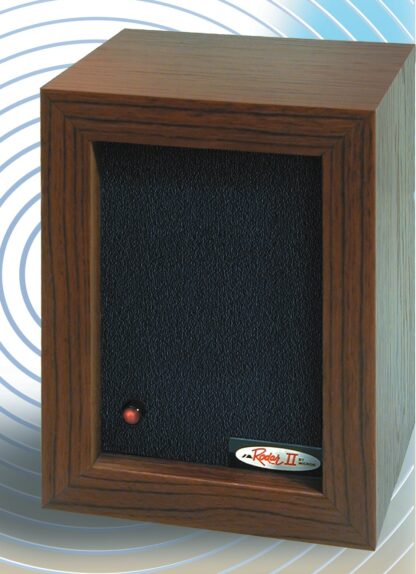
Three steps. Then let RODAR® II work.
Start in the room where pest activity is seen or expected. The front panel should face open space—not a wall, box, curtain, or piece of furniture directly in front of it.
Choose the problem area.
Place RODAR® II in the same enclosed room or zone where droppings, nesting, scratching, entry activity, or pest travel has been noticed.
Connect and confirm.
Connect the supplied adapter and plug it into the correct standard outlet. A blinking red LED indicates that the unit is operating.
Leave it on continuously.
RODAR® II is designed to run around the clock. Continuous operation maintains ultrasonic coverage while sanitation and sealing make the space harder for pests to use.
Give the ultrasonic signal room to travel.
Ultrasonic sound moves through open air and reflects from hard surfaces. It does not travel effectively through walls or closed doors, and dense storage or large furniture can create blocked zones.
A strong starting position
Mount 3–7 feet from the floor or place it securely on a table, shelf, or counter.
Direct the speaker face toward the protected space rather than straight up or into a nearby obstruction.
Do not hide the unit behind furniture, curtains, appliances, boxes, cabinets, or stacked storage.
Closed doors, walls, partitions, and multiple floors may require an additional unit.
If signs continue, move the unit closer, change its angle, clear obstacles, or add coverage.
Kitchens & pantries
Aim across food-adjacent areas while removing crumbs, protecting pet food, sealing packages, and closing gaps around pipes and cabinets.
Attics & eaves
Face open rafters, suspected travel routes, or roosting areas. Follow local wildlife rules before sealing a bat or squirrel exit.
Basements & garages
Keep the front clear of shelving and storage. Aim toward wall edges, utility penetrations, corners, or areas showing activity.
Cabins, campers & storage
Run continuously during inactive periods, keep food sealed or removed, and inspect for openings before pests settle in.
Make the whole space less useful to pests.
RODAR® II is a repelling device—not a substitute for cleaning, maintenance, or exclusion. The strongest setup combines continuous ultrasonic coverage with fewer reasons for pests to stay.
Clean crumbs and spills, secure pantry items, manage trash, and avoid leaving pet food exposed.
Repair leaks, dry damp areas, empty standing water, and improve ventilation where moisture builds up.
Reduce cardboard, paper, fabric piles, and dense storage that provide quiet nesting or hiding places.
After animals have a route out, close gaps around pipes, vents, doors, foundations, eaves, and utility lines.
Confirm the red LED is blinking, clear the sound path, and leave the unit running continuously.
Clean, reduce clutter, secure food, address water, and watch for changes in pest activity.
Every space differs. Reposition the unit, change the angle, clear obstructions, or add units for divided areas.
Aim the setup at the problem you actually have.
Use the same red slash-through icon system included throughout the redesigned RODAR® II pages and printed materials.

Rats & mice
Aim toward wall edges, droppings, gnawing, pantry access, utility openings, or known travel paths. Remove food and seal gaps after activity begins to decline.

Bats
In an attic or garage, aim toward open rafters, roosting areas, or likely entry routes. Keep the unit running after activity stops.

Squirrels
Use in attics, eaves, garages, basements, and enclosed storage areas. Aim into the nesting or travel zone and remove accessible food sources.

Fleas & roaches
Give sound access to the affected room or cabinet area, remove food and water, vacuum thoroughly, and clean surfaces and pet-resting areas.
RODAR® IIUltrasonic pest deterrence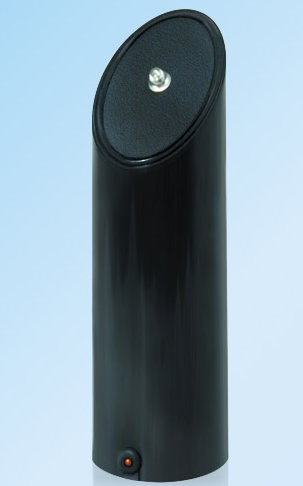 EnergAire®Quiet, filter-free air support
Two products with separate jobs. Position each one for the function it performs.
Focus on the pests. Support the air in the room.
RODAR® II uses ultrasonic sound to help discourage pests from staying. EnergAire® uses quiet, filter-free ionization to support fresher-feeling air and everyday environmental hygiene. Each product works independently; using both can be practical in basements, garages, storage rooms, cabins, campers, offices, and other enclosed spaces.
Aim its front panel across open air toward travel routes, entry areas, or nesting zones.
Place it in an open area rather than behind furniture, boxes, curtains, or inside a tight cabinet.
Continue cleaning, sealing, moisture control, and trash management while the products work in the background.
The key details, in one place.
These values align this instruction page with the current RODAR® II homepage and store listing. See the dedicated Setup & Specs page for expanded buying and coverage guidance.
A few quick checks solve most setup questions.
The red LED is not blinking. What should I check?
Confirm the adapter is fully connected to the unit and outlet, test the outlet with another device, and verify that the adapter matches your RODAR® II. Contact Micron if the light remains off.
Why can’t I hear RODAR® II?
The ultrasonic output is above normal human hearing. A faint mechanical crinkle from the unit can be normal; do not hold the product directly against your ear.
Why am I still seeing signs of pests?
Clear the front of the unit, move it closer to activity, change the aim, remove food and water, reduce clutter, and check for separate rooms or blocked areas that may need another unit.
Can one unit cover several rooms?
Not reliably when walls or closed doors separate the rooms. The 3,000-square-foot rating assumes favorable, relatively open conditions; divided areas often need additional units.
Can I use it around cats and dogs?
RODAR® II is listed for use around non-rodent pets. Do not use it near pet rats, mice, hamsters, gerbils, guinea pigs, or similar small rodent pets.
Can RODAR® II be used outdoors?
It is designed primarily for enclosed indoor use. Never expose the unit or adapter to rain, moisture, or weather; any non-indoor placement must be fully dry and protected.
Questions about placement, service, or reordering?
RODAR® II is manufactured and supported by Micron Corporation. Contact the team for setup help, replacement adapter information, service questions, warranty support, or assistance choosing additional units.