
RODAR® II returns & warranty
Straightforward support after the purchase.
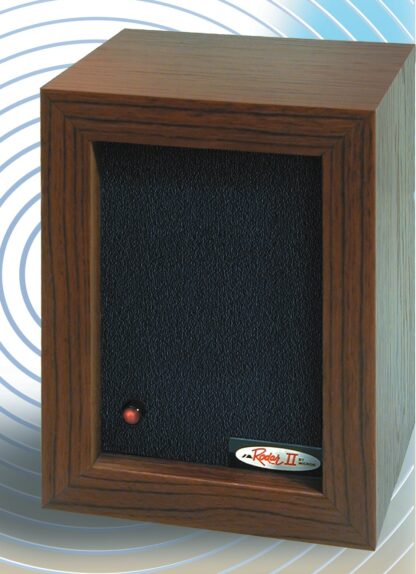
RODAR® II includes a 90-day money-back guarantee and a 12-month warranty against defects in materials and workmanship. Before returning any product, request a Return Merchandise Authorization—an RMA—from Micron.
Know which protection applies
Two protections for two different situations.
The money-back guarantee is for a return during the first 90 days. The 12-month warranty addresses defects in materials and workmanship. Micron will review the purchase details and explain the correct next step.
Day money-back guarantee
If RODAR® II is not the right fit, contact Micron within 90 days of purchase to request an RMA and return instructions. Opened and tested units are eligible under the money-back guarantee. The customer pays return shipping. Refunds are processed within 5 business days after Micron receives the authorized return. Do not send the product before authorization is issued.
Month warranty
RODAR® II is covered for 12 months against defects in materials and workmanship. Contact Micron for an RMA and evaluation instructions before returning a unit for warranty service.
Return authorization required
Request an RMA before shipping anything back.
An RMA connects the product to the customer request and gives the Micron team the information needed to provide the correct return address, packing instructions, and next steps.
How the process works
Contact first. Ship second.
The steps are designed to keep the return connected to the correct customer, purchase, and reason for service.
Contact Micron.
Email service@microncorp.com or call 1-800-456-0734. Explain whether the request is a money-back return, a possible defect, or another product issue.
Receive the RMA.
Micron will review the information and provide the authorization number, return destination, and instructions that apply to the request.
Pack as directed.
Protect the unit during shipping, include the items requested by the support team, and reference the RMA exactly as instructed.
Micron reviews the return.
After the authorized return is received, Micron will evaluate it and confirm the applicable refund, warranty service, or other resolution.
Help us respond faster
Include the details that identify the purchase.
Providing a complete first message can reduce back-and-forth and help Micron determine whether the request is a return, warranty evaluation, setup issue, or replacement-part question.
Name, email address, and the best phone number for follow-up.
Order number, receipt, purchase date, and where the product was purchased, when available.
Briefly explain whether you are seeking a 90-day return or reporting a possible defect in materials or workmanship.
Describe the symptom, operating light, adapter, setup, and any troubleshooting already completed. Add photos if they would clarify damage or a product issue.
Subject: RODAR II RMA Request  Name:
Order number (if available):
Purchase date:
Reason for return or warranty service:
Best phone number:
Prepare the authorized return
Follow the RMA instructions—not a guessed address.
Once Micron issues the RMA, use the return destination and packaging directions provided for that specific request.
Use the original packaging when available or equivalent protective packaging that helps prevent damage in transit.
The support team will specify whether the unit, adapter, accessories, proof of purchase, or other materials should be included.
Place the authorization number where Micron directs so the shipment can be matched to the open request.
Retain the carrier receipt and tracking information until the return has been received and resolved.
Optional quick checks
A simple support check may save a return.
These checks are optional and do not replace the guarantee or warranty. They can help identify a power, adapter, or placement issue before the product is packed.
Confirm power.
Test the outlet with another device, reconnect the supplied adapter at both ends, and check whether the red operating light is blinking.
Confirm the adapter.
Use the supplied RODAR® II adapter or a genuine compatible replacement. An unverified universal power supply can create a misleading product symptom.
Review placement.
If the concern is performance rather than a defect, point the front panel into open space and keep walls, doors, furniture, and boxes from blocking the ultrasonic path.
Returns & warranty FAQ
Answers before you send anything back.
For questions not covered here, email service@microncorp.com or call 1-800-456-0734.
Do I need an RMA before returning RODAR® II?
Yes. Contact Micron before shipping. The RMA identifies the request and provides the correct return destination and instructions.
How do I request an RMA?
Email service@microncorp.com with the subject “RODAR II RMA Request,” or call 1-800-456-0734. Include purchase and contact details when available.
What is the difference between the guarantee and warranty?
The 90-day money-back guarantee supports an eligible return during the guarantee period. The 12-month warranty addresses defects in materials and workmanship.
Can I mail the product to Micron without contacting support?
No. Do not use a general company or mailing address for a return unless Micron provides it with the RMA. Unauthorized shipments can delay processing.
What should I include in the first email?
Include your name, contact details, order number or receipt when available, purchase date, reason for the request, and a description of any product issue.
Who pays return shipping?
The customer pays return shipping. Request an RMA and wait for Micron’s return instructions before choosing a carrier or sending the product.
What if I purchased RODAR® II from another retailer?
Contact Micron with the retailer name, receipt, and purchase date. The support team can review the details and direct you to the appropriate return or warranty path.
What does the 12-month warranty cover?
It covers defects in materials and workmanship for 12 months. Micron will review the reported issue and purchase details before confirming warranty eligibility and the available resolution.
Ready for the next step?
Start with Micron—not the shipping label.
Request the RMA first. Micron will confirm the applicable policy, provide the correct return instructions, and keep the product connected to the customer request.