When the Design Changes,
What Else Needs to Change?
A practical guide to PCB assembly change control: keeping board revisions, component lists, firmware, test procedures, and the next production lot in sync.
A new board revision is only part of the release.
A connector moves. A component becomes unavailable. A firmware update changes how a sensor is read. Each can be a reasonable improvement—and each can affect instructions somewhere else in the build.
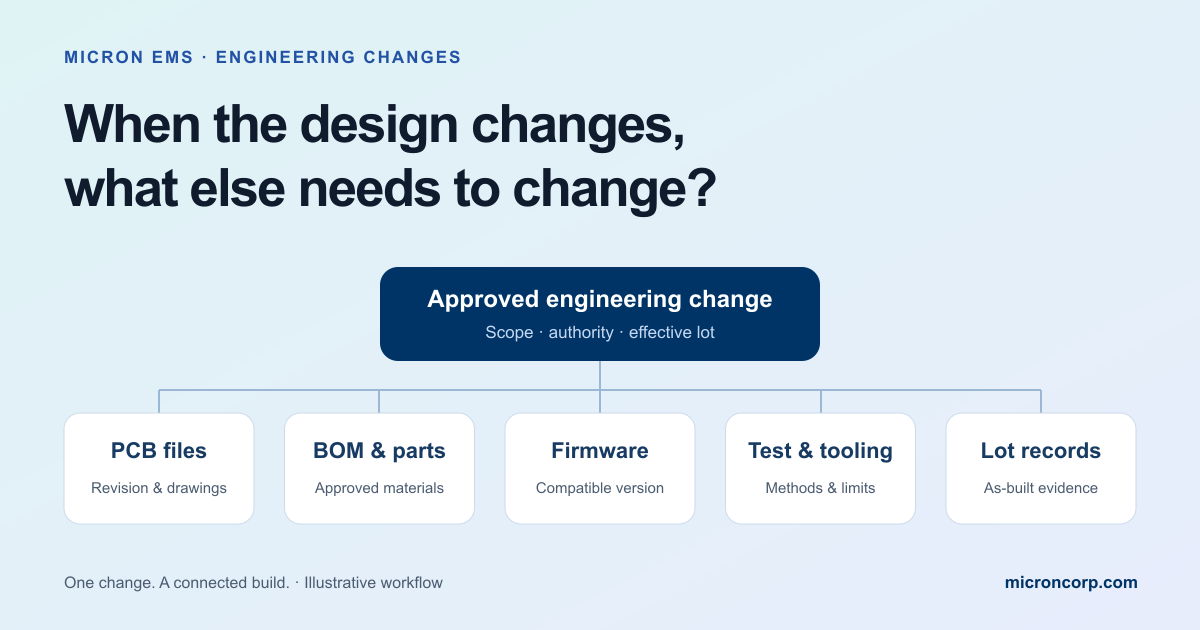
PCB assembly change control connects that improvement to the people, materials, software, and evidence needed to manufacture it. Before the next lot starts, identify what is affected, obtain the required approvals, and define exactly when the change takes effect.
Last week, we explored five questions behind dependable electronics. This week, we follow one of them onto the manufacturing floor: how do you keep everyone building the same approved version when the design evolves?
Follow the change through files, parts, software, tooling, and records.
Identify the first affected lot and the disposition of existing material.
Check the actual build against the released instructions.
The build package is a set of compatible instructions.
Think of the approved build package as the agreed description of the product you intend to make. It can include PCB fabrication data, the bill of materials (BOM), assembly drawings, firmware, programming instructions, test procedures, and labeling requirements.
Those items do not have to share the same revision letter. A board at revision C might correctly use firmware 2.4 and test procedure revision B. What matters is a controlled record showing that those specific versions belong together.
NASA’s configuration management guidance describes the broader discipline of keeping an approved product and its information consistent while controlling changes. The practical application here is a coordinated release suited to the product and project.
Five checks before releasing the next build.
An engineering change order, often called an ECO, records the approved change and how it will be implemented. The format can be simple. Its usefulness depends on resolving the connected questions.
PCB files and assembly instructions
Does the change affect the schematic, board layout, fabrication data, placement file, drawing, or assembly sequence? Review interfaces such as connector orientation and enclosure clearance. Update affected items, and record the review where an item stays the same.
The BOM and material already purchased
Identify the exact manufacturer part number and any approved alternatives. Check open orders, stock, kits, and assemblies already in process. A proposed substitute needs the product team’s required review; availability alone does not establish compatibility. Our resilient BOM guide explains the planning behind those choices.
Firmware and programming
Confirm which firmware and configuration belong with the hardware. A pin assignment, device address, or sensor characteristic can affect software behavior. Record the approved image identifier and programming instructions, and establish how the loaded version will be verified.
Test procedures, fixtures, and limits
Determine whether a fixture, probe location, test script, cable, or acceptance limit needs changing. Keep inspection and functional verification tied to the product’s requirements. If a requirement changes, approve that decision and its evidence before changing the pass/fail limits.
Labels, lot records, and service information
Decide how the new configuration will be identified after shipment. Review serial or lot records, revision labels, and service instructions where applicable. A returned unit should lead back to the hardware, software, and test procedure actually used to build it.
The connector moved. The fixture did not.
Imagine a small controller board whose connector moves to make a cable easier to reach inside its enclosure. The new PCB files are released, the parts are correct, and assembly follows the revised drawing.
At test, the old fixture no longer mates with the board. The product improvement may be sound, but the release did not account for how the revised assembly would be verified.
The impact review should connect the connector location to fixture access, cable routing, enclosure fit, and the applicable test instructions. If the electrical connections change too, firmware and test scripts need their own review. A physical change can have consequences beyond the drawing that introduced it.
| Connected item | Question to resolve |
|---|---|
| Assembly | Can the cable be installed and retained in the revised enclosure arrangement? |
| Test fixture | Can the fixture reach and connect to the revised board? |
| Software | Are pin assignments and expected behavior unchanged? |
| Existing stock | Which orders can use the earlier version, and how will they stay identifiable? |
This example illustrates a review process; it does not describe a Micron customer project.
“Use the new revision” needs a starting point.
A release date by itself may leave purchasing, production, and service interpreting the change differently. Define its effective point: a named work order, lot, serial-number range, or another agreed boundary.
Then decide what happens to earlier material and work in progress. Depending on the approved review, existing items might remain assigned to an earlier configuration, be reworked, be returned, or be held pending a decision. Those decisions need an owner and a record.
A temporary deviation also needs clear boundaries: what is permitted, who approved it, which units it covers, and when it expires. It should remain distinguishable from a permanent design release.
A release checklist worth bringing to the conversation.
Define the change and its reason.
Identify the affected assembly, earlier configuration, proposed configuration, and the problem or improvement being addressed.
Review every connected item.
Files, BOM, material, firmware, tooling, tests, labels, and service information. Record updates and decisions to retain existing versions.
Name the required approvers.
Agree who can approve the design, material substitution, software, test changes, and disposition of existing stock.
Specify the first affected build.
Name the lot, order, or serial range. Define the treatment of stock, open orders, work in progress, and shipped units where relevant.
Make the approved package available.
Provide the compatible versions to the people building and checking the product. Remove superseded instructions from active use while preserving history.
Verify and retain the result.
Confirm implementation, complete the agreed checks, resolve open issues, and connect the evidence to the changed build.
A useful opening question: “We are changing this item for this reason. What else does it touch, who needs to approve it, and how will we know the first affected lot was built correctly?”
Keep the control proportional to the change.
Does every document need a new revision?
No. Review the affected items and update those that need changing under your agreed control process. Unaffected items can retain their versions; the released package should identify the approved combination.
Can an available component be substituted immediately?
Only within the approved sourcing and substitution rules for that product. A matching description or package does not establish electrical, software, mechanical, or process compatibility. Identify who approves the alternative and what verification is required.
Do we need a large change-control system for a small production run?
The process can be modest. A controlled change record, clear approvals, an identified effective lot, and linked verification may be an appropriate starting point. The product’s requirements and the impact of the change determine the necessary detail.
Connect the change to the rest of the build.
Turn prototype findings into instructions the next build can follow.
Read the article →Inspection & testingKnow what each check verifies.Understand how inspection and test methods answer different questions.
Read the article →After shipmentPreserve the build history.Link the shipped assembly to the records needed for later investigation.
Read the article →