
RODAR® II product support
Clear answers. Practical help. Direct from Micron.
Get help choosing, setting up, or ordering RODAR® II — including placement guidance, coverage questions, replacement parts, and support after purchase.
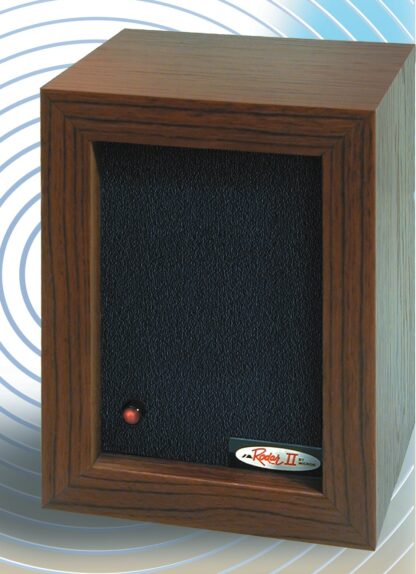
Support built around the space you are trying to protect.
Share the pest type, room layout, current placement, and time in use. Those details help Micron provide a clearer next step.
Start here
Choose the support path that fits the question.
RODAR® II support should feel simple. Start with the area below that matches the situation, then call or email Micron with the details that help the support team respond quickly.
Before buying
Get help deciding whether RODAR® II is a fit for the pest type, room layout, coverage need, and pet situation.
Setup & placement
Improve coverage by aiming the front of the unit into open space, pest activity areas, or likely entry points.
Orders & parts
Find order help, replacement adapters, reorders, and current product links through the Micron Store.
Multiple units
For divided rooms, dense storage, commercial spaces, or recurring pest pressure, support can help think through coverage zones.
Quick setup support
Most support questions start with placement.
RODAR® II works best when ultrasonic sound has a clear path into the protected area. Walls, closed doors, cabinets, heavy furniture, and packed storage can reduce coverage.
Point the front into the protected area.
Aim toward pest activity, travel paths, roosting areas, nesting areas, or open room space.
Give ultrasound a clear path.
Keep the unit from being blocked by boxes, curtains, furniture, appliances, shelves, doors, or tight corners.
Leave it on continuously.
Plug into a standard outlet, confirm the operating light, and let RODAR® II run 24 hours a day for best results.
Better answers, faster
Have these details ready before contacting support.
A few details make it easier to diagnose placement issues, coverage gaps, and order questions without back-and-forth.
Pest type and location
Share whether the issue involves mice, rats, bats, squirrels, fleas, roaches, or other pests, plus where activity is being seen.
Room layout
Describe walls, doors, furniture, cabinets, storage boxes, shelving, and whether the room is open or divided.
Current placement
Note where the unit is plugged in, which direction it faces, whether it is blocked, and whether it runs continuously.
Time in use
Include when RODAR® II was installed and whether pest activity has changed since setup.
Order information
For order, warranty, or adapter questions, include the order number, customer name, email address, or purchase date.
Pet notes
RODAR® II is intended for non-rodent pets. Mention any pet rodents or small rodent-like pets before using the device nearby.
Orders & replacement parts
Keep RODAR® II running continuously.
RODAR® II is designed to stay plugged in. The Micron Store is the best place to order a new unit, reorder additional units, or purchase a genuine replacement adapter for the 110V US standard version.
Returns, warranty & service
Need to return your RODAR® II or request warranty service?
RODAR® II is backed by a 90-day money-back guarantee and a 12-month warranty against defects in materials and workmanship. Before shipping anything to Micron, contact the support team to request a Return Merchandise Authorization—an RMA—and receive the appropriate return instructions.
Gather your purchase information.
Have your name, order number, purchase date, contact information, and a brief explanation of the return or warranty request available.
Request an RMA from Micron.
Email service@microncorp.com or call 1-800-456-0734 . Please do not send the product back before an RMA has been issued.
Follow the return instructions provided.
Micron will provide the RMA information, return address, packing guidance, and any additional details needed for your specific return or warranty request.
Helpful RODAR® II resources
Find the answer without waiting.
The redesigned RODAR® II pages now work together as a simple support library: learn how ultrasonic pest control works, how to place the unit, what customers report, and how to reduce pest pressure.
How it works
Understand ultrasonic pest deterrence in plain English.
Setup & specs
Placement, coverage, specs, and how many units to use.
Instructions
Quick setup steps and the online setup guide.
Reviews
Customer stories and real-world placement lessons.
Free pest guide
Simple prevention habits that help make spaces less inviting.
 Rats & mice
 Squirrels
 Bats
Bats Fleas, roaches & more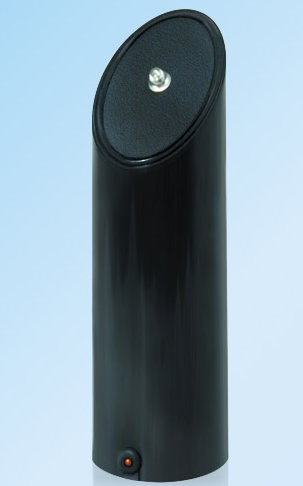
One room, two separate jobs. RODAR® II focuses on pest deterrence. EnergAire® focuses on the air people breathe and experience in the room.
Using both products? Keep their placement separate and their purpose clear.
RODAR® II should face the area where pest activity is occurring or likely to occur. EnergAire® should sit where room air can circulate freely. They can be used in the same room without being placed together or plugged into the same outlet.
This pairing is well suited to basements, garages, storage rooms, cabins, campers, workshops, and offices where pest deterrence and everyday air comfort are both priorities.
Check for a clear sound path and move the unit closer to the activity area when walls, doors, or storage divide the space.
Keep space around the unit and avoid enclosing it in a cabinet or behind furniture.
Micron support can help with ordering, replacement information, and basic placement questions for both products.
Contact RODAR® II support
Need help from a person?
For product support, setup questions, replacement information, service questions, or reorders, contact Micron using the RODAR® II support details below.
Support FAQ
Answers before the next step.
These answers are written for customers who need practical help with choosing, setting up, troubleshooting, or ordering RODAR® II.
What is the fastest way to get RODAR® II support?
Call 1-800-456-0734 or (781) 949-3500 for product, setup, service, or reorder questions. Email service@microncorp.com when photos, room details, or order information would be helpful.
What information should be included in a support email?
Include the pest type, room type, unit placement, direction the front panel faces, how long it has been running, whether anything blocks it, and the order number if the question involves a purchase.
Where should RODAR® II be placed?
Place or mount the unit so the front panel faces the protected area. A wall-mounted position around 3–7 feet from the floor can work well when the unit has an open path into the room.
Does ultrasonic sound go through walls?
No. Ultrasonic sound works through open air and can reflect off hard surfaces, but walls, doors, cabinets, heavy furniture, and packed storage can reduce or block coverage.
How many units are needed?
One unit can cover up to 3,000 square feet under favorable conditions. Divided rooms, closed doors, cluttered storage areas, or separate problem zones may require additional units.
How long should RODAR® II stay plugged in?
Leave RODAR® II plugged in continuously, 24 hours a day, for best results. The operating light helps confirm that the unit is receiving power.
When should results be evaluated?
Every space is different. Many users evaluate progress over the first two to three weeks while the unit runs continuously and sanitation, sealing, and clutter reduction are improved.
What if pest activity continues?
Check the sound path, reposition the unit toward activity, reduce food and water sources, seal openings after pests have a route out, and consider additional units for blocked or divided areas.
Is RODAR® II safe for pets?
RODAR® II is listed for use around non-rodent pets. Because it is designed to repel rodents, do not use it near pet rats, mice, hamsters, gerbils, guinea pigs, or similar small rodent pets.
Where can a replacement adapter be purchased?
The Micron Store offers a genuine 110V US standard replacement adapter made for RODAR® II. Do not use an unverified universal power supply.
Can RODAR® II be used outdoors?
Indoor use is recommended for best performance. Outdoor use requires weather protection and a direct aim at the area to be protected. Contact support before using the unit outside.
Is this the right page for EMS manufacturing inquiries?
No. This support page is for RODAR® II product and order help. Electronics manufacturing, RFQ, BOM, SMT, or through-hole service inquiries should use Micron’s corporate EMS contact page.
Support with a next step
Get the answer, then protect the space.
For setup questions, order questions, replacement parts, and product help, contact Micron. For immediate ordering, use the Micron Store and keep RODAR® II running continuously in the space that needs coverage.